


Dropshipping Order Status Sync – Common Problems and How to Fix Them
Order placed. Payment confirmed. Now what? In dropshipping, that question has more answers than you might expect – and each step is a place where something can go wrong. If you’re spending too much time answering "where is my order?" messages, this article is for you.
Where the Problem Starts – Order Placed, But What Happens Next?
Dropshipping looks simple from the outside: a customer buys from your store, the supplier ships the package, you collect your margin. In reality, between "customer bought" and "customer received" there are several steps – and each one is a potential bottleneck.
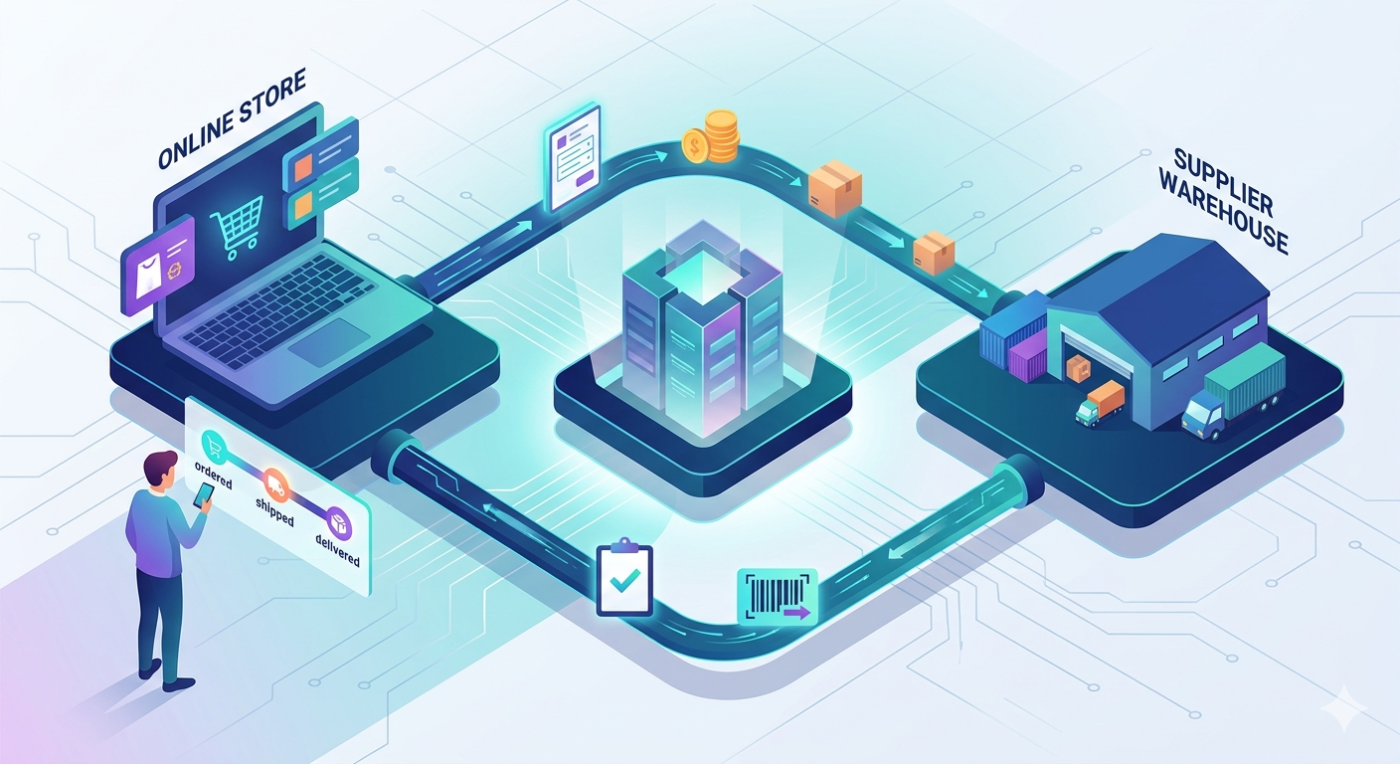
The flow looks like this:
- Customer places an order in your store
- Order is forwarded to the supplier (manually or automatically)
- Supplier confirms and processes the order
- Supplier ships the package and generates a tracking number
- Tracking number is sent back to your store
- Your store notifies the customer and shares the tracking
- Customer receives the package
When managed manually, every single step requires someone’s attention. When automated – the system handles it for you. The difference between these two approaches isn’t just convenience. It’s real money and time.
Problem 1: Order Status Out of Sync – Your Store Says "Processing", Supplier Already Shipped
Order status isn’t just information for the customer. It’s the backbone of communication between your store and your supplier – and between you and the buyer.
The problem appears when both sides say different things. The customer sees "order processing" in their account for three days. Meanwhile, the supplier shipped the package yesterday – but that information never reached your store.
The outcome is predictable: the customer gets anxious. They send a message. They call. They might leave a negative review before the package even arrives.
In a small store with a few dozen orders per month, you can still manage this manually. But with several dozen orders per week – you can’t. And that’s when a status sync problem stops being an operational issue and becomes a business problem.
Problem 2: Supplier Doesn’t Send Tracking Numbers – Your Customer Is Left in the Dark
A shipment tracking number is a basic expectation today. Any customer who shops online expects to receive it automatically once their order ships. It’s not a nice-to-have – it’s a standard part of the buying experience.
In the dropshipping model, that number has to travel through several hands: the supplier generates it with the courier, then it needs to reach your store, from where it gets forwarded to the customer. Sounds simple – but when that link breaks, a chain of problems follows.
The customer doesn’t get the tracking number. They don’t know where their package is. They contact you. You check with the supplier. The supplier responds eventually. You relay the information to the customer. By now, the customer is already wondering whether to file a dispute.
This is especially damaging if you sell on marketplaces. On platforms like Amazon or eBay, poor customer experience has direct consequences – lower seller metrics, reduced listing visibility, and in recurring cases, the risk of account suspension.
Problem 3: Support Tickets Keep Growing – and It’s Not Because You Have Difficult Customers
If your support team is mostly handling "where is my order?" messages – you’re dealing with a symptom, not the problem. The real issue lies elsewhere.
Most of these inquiries don’t happen because something actually went wrong with the shipment. They happen because of missing information. The customer didn’t receive tracking. Or the order status hasn’t changed in two days. Or they got a confirmation email and then – silence.
With 50 orders per month, that’s a handful of messages. With 200 – it’s dozens. With 1,000 – someone is handling this full-time, answering questions that a properly configured system would have prevented entirely.
This isn’t an abstract cost. It’s your time – or your employee’s time – spent on messages that could have been eliminated with one decision about automation.
What a Working Flow Looks Like – The Benchmark
To understand where the problem is, it helps to picture what automatic order forwarding should look like when it works correctly.
A customer places an order in your store. The system automatically – without your intervention – forwards it to the supplier. No manual data entry, no copy-pasting addresses, no emails to send. This eliminates typos, address mistakes, and delays caused by someone being on a lunch break.
The supplier accepts the order and confirms processing – the status in your store updates automatically. When the package ships, the tracking number comes back to your store. The customer receives an email with shipping confirmation and a tracking link. Without a single support ticket.
Megamo handles this entire flow automatically: order transfer to the supplier, status synchronization, and retrieval of the tracking number from the supplier – which then reaches your store and your customer. You can monitor everything – but you don’t need to intervene.
When Automation Stops Being Optional
You don’t need a thousand orders per month for automation to make sense.
The threshold where it starts paying off is a few hundred products and several dozen orders per month. At that scale, manual order forwarding technically still works – but it starts consuming time that could go elsewhere. As volume grows, it becomes a bottleneck.
The situation gets more complex when you work with multiple suppliers. Each one may use a different data format – XML, CSV, their own API. Each has a different way of passing statuses and tracking numbers. Without a central system, that means managing several separate processes simultaneously, with room for error in each.
So if you’re planning to grow – it’s better to set up automation before scale forces you into firefighting mode. Automation of stock and order sync pays off from as few as 200-500 products. That’s much earlier than most store owners assume.
It’s also worth keeping in mind that outdated stock information and delayed order statuses are a direct cause of cancellations – especially on marketplaces. An estimated 15-25% of marketplace cancellations stem from inaccurate supplier stock data.
Summary
The three problems described – missing status sync, no automatic tracking number forwarding, and growing support volume – share a common root: no automated flow of information between your store and your supplier.
Fixing this doesn’t require a developer or a complex custom integration. It requires the right system to handle the entire flow: from forwarding the order to the supplier, through status updates, to delivering tracking to the customer.
See how automatic order forwarding works in Megamo – and decide whether your store is losing time and money where it shouldn’t be.